Coming soon · For macOS and the browser · 100% on your device
Go over your photos and videos with a fine-tooth comb.
Pentefino finds the duplicates that pile up on your computer, such as exact copies, versions recompressed by messaging apps, re-encodes and resized ones. It shows which copy is best and tidies the rest. No uploads, no surprises.
Pentefino hasn't launched yet. Join the waitlist and we'll let you know when it opens.
- Nothing leaves your device
- Nothing is deleted without you
- One-click undo
- Photos and videos
The same photo, five times.
Repeated downloads, backups, messaging apps recompressing everything, the same folder copied to an external drive. Names change, sizes change, and your disk keeps filling up. Comparing names or bytes does not catch them; the content has to be compared.
Messaging apps and social media
They reduce resolution and recompress. To your computer the copy looks different, but it is the same photo.
Format conversions
PNG turned JPEG, MOV turned MP4, video turned WebM. Duplicated under another name.
Scattered folders
Downloads, backups and safety copies. The same memory in three different places.
Built to be right, and easy.
The accuracy of a professional tool, with an interface anyone understands.
Finds what others miss
Exact, resized, recompressed and format-converted copies, in any folder, under any name. Rotated or mirrored photos too, if you want.
Picks the best copy
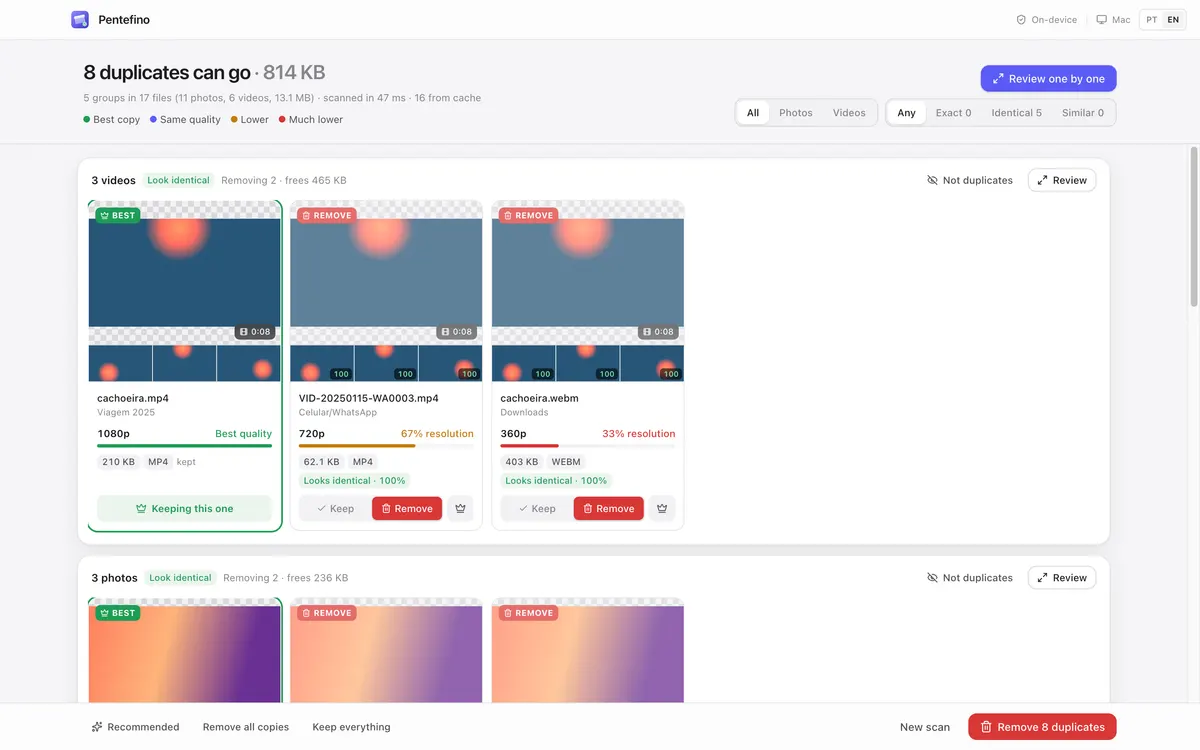
Highest resolution, highest bitrate, the most original file. Every copy is colour-coded: green for the best, amber and red for lower quality.
Real video matching
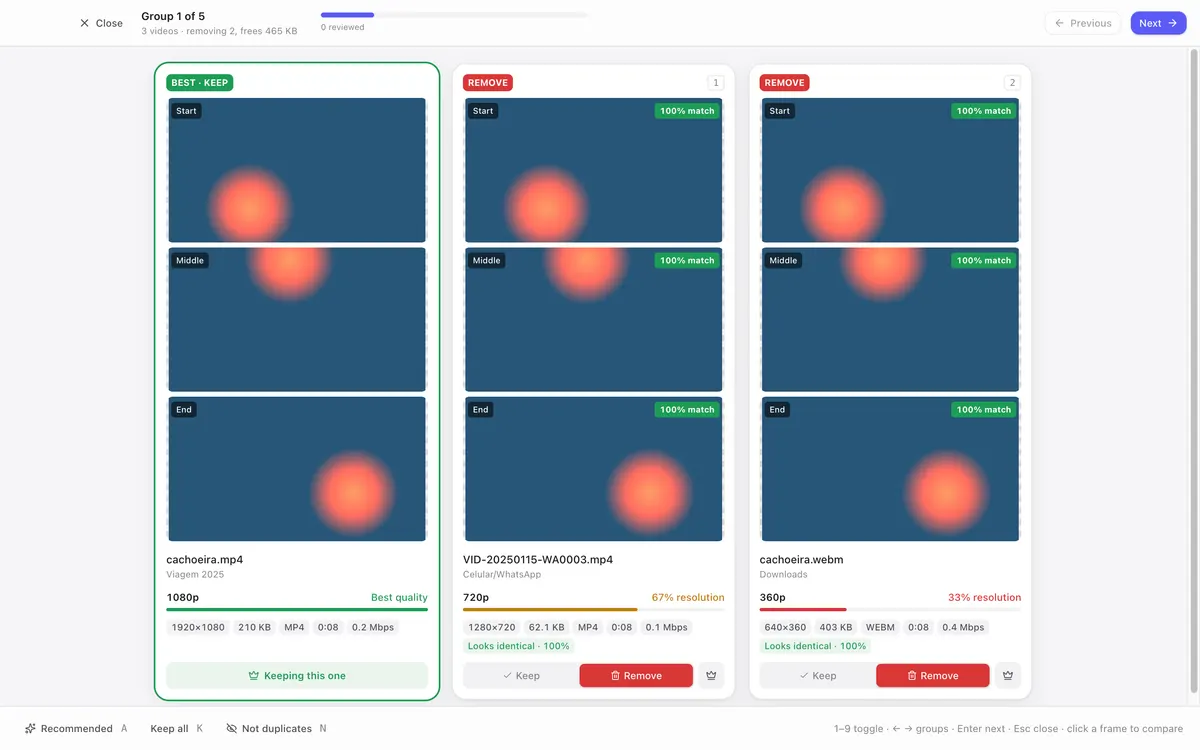
Nine frames of every video are analysed. In review you see start, middle and end side by side, with a match score for each frame.
One-by-one review
A focused, keyboard-driven view to decide group by group. Or trust the recommendation and finish in one click.
Safe by default
Duplicates go to a folder you review, or to the Trash. Nothing is overwritten, everything is logged, and it can all be undone.
Fast and private
Every CPU core and hardware video decoding, with nothing sent to the internet. Rescanning the same folder is almost instant.
Three steps. No guesswork.
- 1
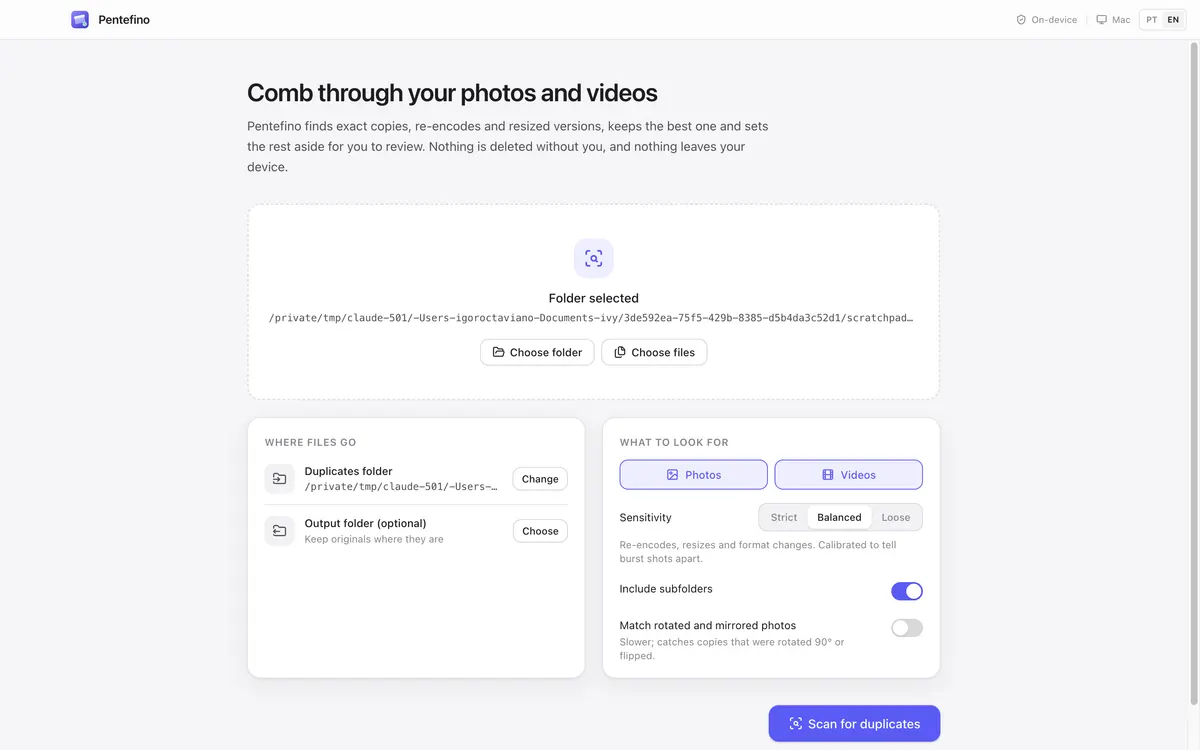
Choose a folder
Drag it onto the window or pick folders and files. Subfolders are included automatically.
- 2
See what can go
Pentefino groups the duplicates, highlights the best copy and applies its recommendation. You see how much space you will free.
- 3
Review and remove
Go group by group or trust the recommendation. Duplicates go to the duplicates folder or the Trash.
Accuracy calibrated on a real library.
Most tools only compare image “fingerprints” and mistake burst shots for copies. Pentefino confirms every candidate with structural similarity (SSIM), using thresholds calibrated on a real 4,800-file library.
- similarity of real photo copies
- ≥ 0.94
- maximum between different photos of one burst
- ≤ 0.81
- videos: real copies vs. different videos
- ≥ 0.86 vs ≤ 0.15
- for 4,255 files (43.6 GB) on the first scan
- < 4 min
Why not an ordinary duplicate finder?
| Feature | Pentefino | Typical finders |
|---|---|---|
| Exact copies | yes | yes |
| Resized and recompressed copies | yes | Sometimes |
| Videos in another format or resolution | yes | no |
| Tells burst shots from copies | yes | no |
| Shows which copy has the best quality | yes | no |
| Nothing sent to the internet | yes | It depends |
| One-click undo | yes | no |
Simple.
Try it free in the browser with an account. Get the Mac app when you want the full experience.
Web
Free up to 200 duplicates per account
- ✓Free account, no card needed
- ✓Full photo and video detection
- ✓One-by-one review
- ✓Move duplicates (Chrome, Edge, Arc, Brave)
- ✓Report and script in other browsers
Pentefino for Mac
$12 one-time purchase
- ✓Everything in the web version, with no duplicate limit
- ✓HEIC and extra video formats
- ✓Send to Trash
- ✓Drag and drop folders
- ✓Native app for Apple Silicon and Intel
- ✓Updates for version 1.x
7-day guarantee: if you do not like it, we refund you.
Frequently asked questions
Are my files uploaded anywhere?
No. All analysis happens on your computer or in your browser. Pentefino has no server that receives your photos, and collects no usage data. The web version asks for a free account only to count how many duplicates you have resolved.
Does Pentefino delete my files?
Not without you. By default duplicates go to a “_duplicates” folder you can review at your pace, or you can choose the Trash. Nothing is overwritten, and every run is logged so you can undo it.
How does it know which copy is best?
It compares resolution, duration, bitrate, size, format and date. The best copy is highlighted in green, and you can pick another with one click.
Which formats are supported?
Photos: JPEG, PNG, WebP, AVIF, GIF, BMP, TIFF and, on the Mac, HEIC. Videos: MP4, MOV, M4V, WebM, MKV and more; on the Mac, unusual codecs use ffmpeg if it is installed.
Does it work with the Apple Photos library or iCloud?
Pentefino works with folders. For the Photos library, export the items to a folder first. Folders synced with iCloud Drive work normally.
What if it gets something wrong?
Only exact copies and ones that look identical are pre-selected. Merely similar ones are kept until you decide, and you can compare side by side first. Changed your mind later? Undo.
Is there a Windows version?
Not yet. The web version works in Chrome and Edge on Windows, with full detection.

Free up space without losing a single memory.
Pentefino is coming soon. Join the waitlist to hear when it launches.